
Features
What Tundra does today, in the open beta. Everything below is in the app now; macOS is the build we use every day, and Windows and Linux builds ship with each release. Everything on this page works without AI unless it says otherwise.
Command
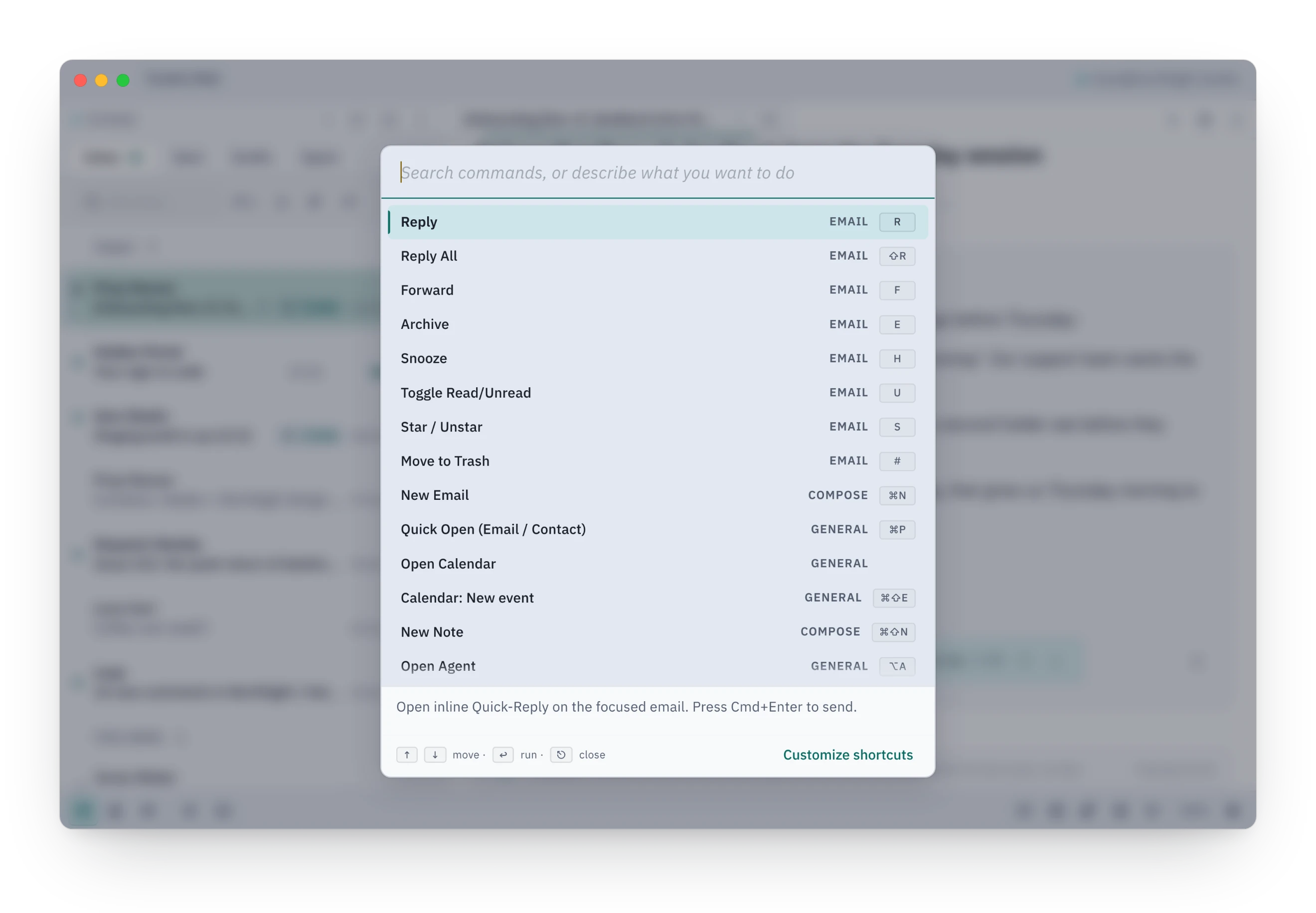
Do anything from one box, and pick up the keys as you go.
Every action in Tundra is in one list: open a view, act on an email, change a setting. Commands show their shortcut beside them, so you learn the keys by using them. Short questions about your meetings, your day and your replies get an answer right there. For real work, ⌘L opens the Agent chat on the model you choose.
AI features stay off until you turn them on. Bring a cloud key (OpenAI, Anthropic, Google Gemini, Mistral, OpenRouter) or a local server (LM Studio, Ollama), and pick a model per job. The agent reads your mail, cites what it read, and proposes changes as cards you approve. Sending an email always needs your OK.
- Customize shortcuts from the same list
- Your day: a start-of-day brief of meetings, what you owe and who you are waiting on, built without a model
- Meeting prep assembled from your mail with no network and no model
- Autonomy per chat: Balanced, Careful, Hands-free or Read-only
- MCP servers can be connected as tools. A call asks first, and you can allow it once, for this chat, or always
- Dictation on-device on macOS for English, or through a Whisper-compatible server
Find
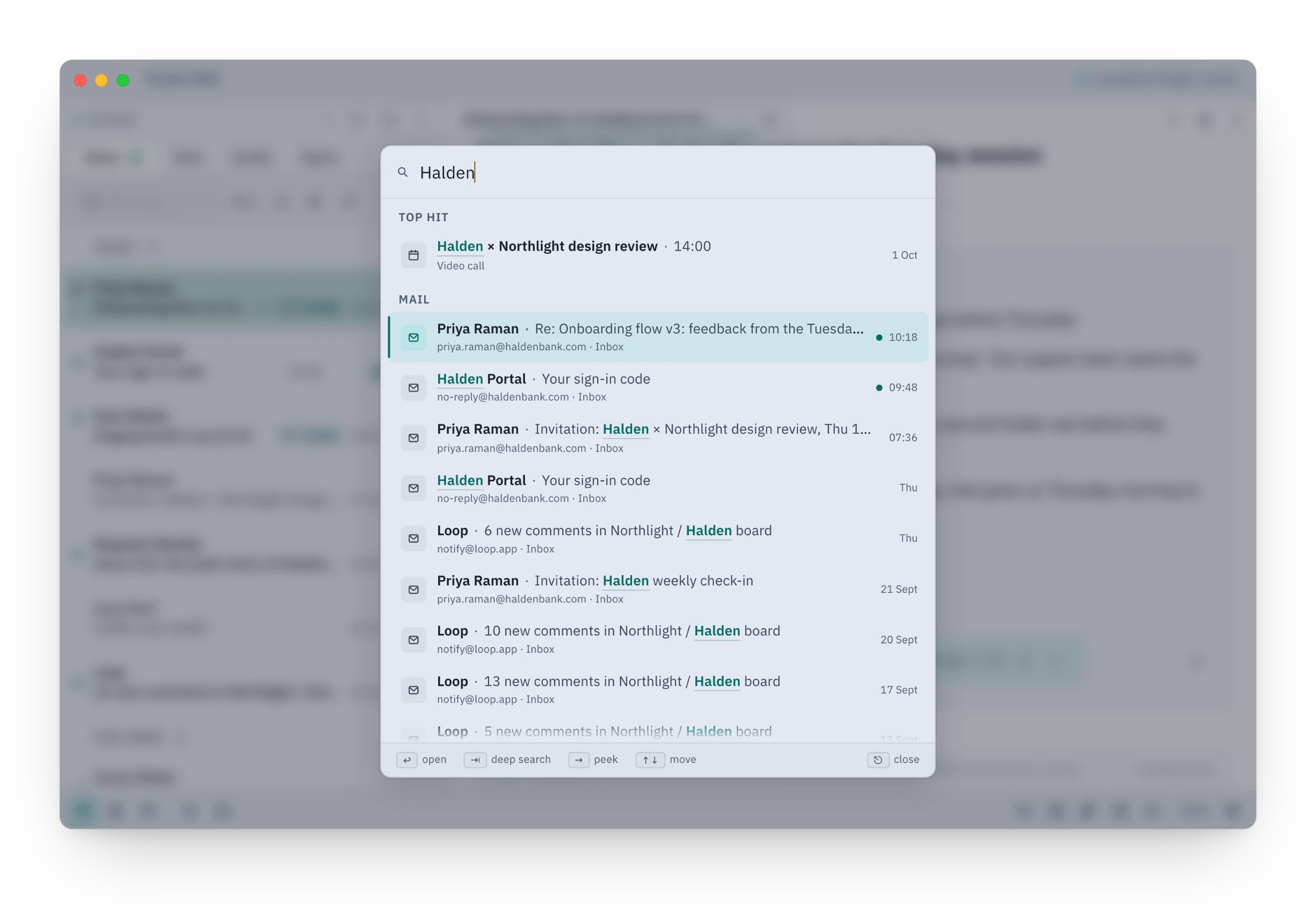
Find the email while you are still typing.
⌘P shows the best match first. Press → to read it without opening it, or Tab for a full search across mail, notes and files, with every match highlighted in context.
Tab hands the query to Full Search with from:, OR, NOT, quoted phrases and a regular-expression mode.
- / filters the list you are looking at
- Search one account or all of them
- Open a long thread right at the match
Write
A better sentence, without losing your own.
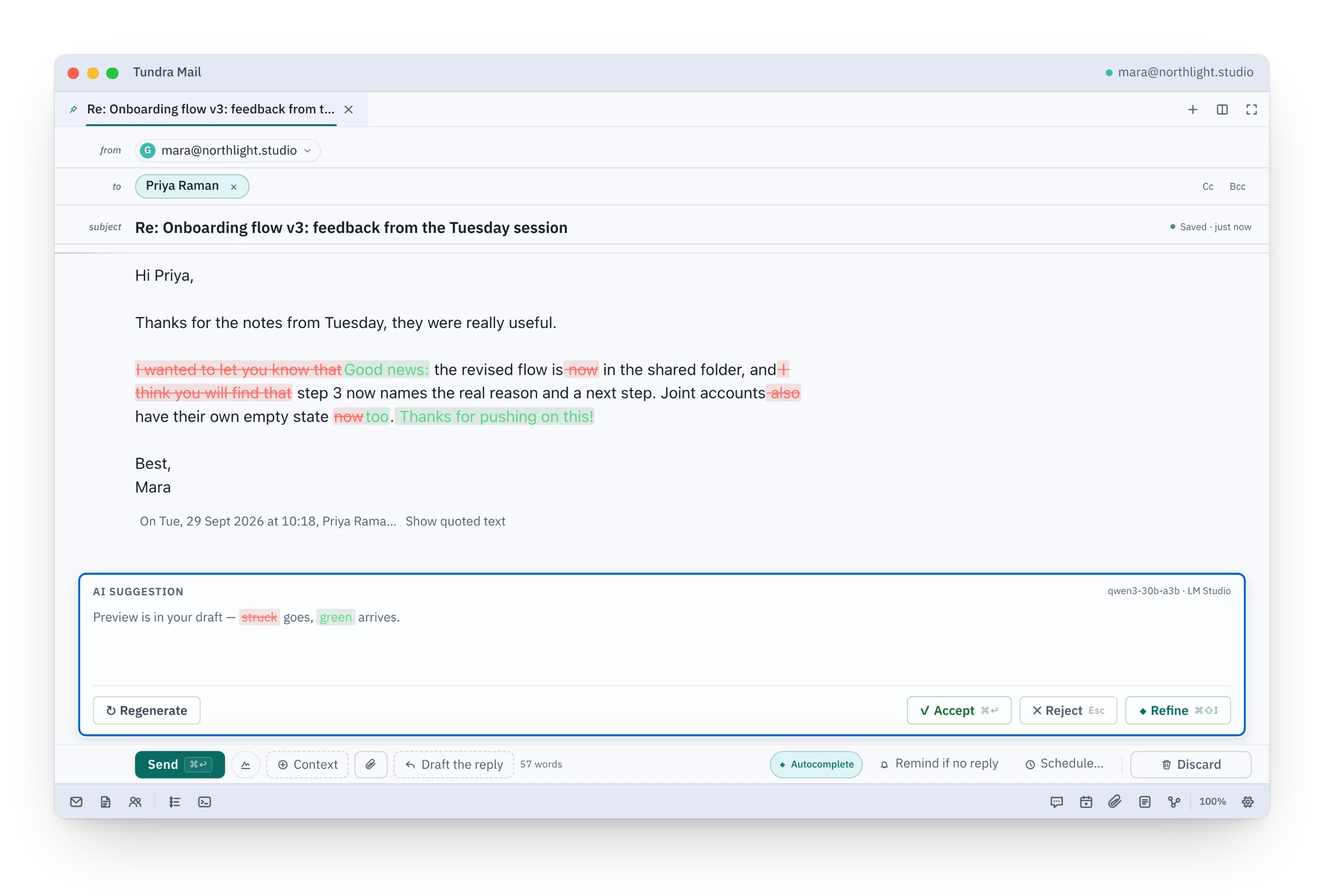
Select a passage and press ⌘⇧I, or press it with nothing selected to work on the whole draft. Say what you want, or tap Fix grammar, Shorten, Friendly, Formal, Simplify, Bullets or another quick command. The change is painted into your draft as tracked changes, red for what goes and green for what arrives, and nothing changes until you accept. Names, dates and amounts the model cannot back up are highlighted.
Write with AI drafts new text at the caret and checks it against your ask: paragraph and sentence counts, phrases to include or avoid, and every point you listed. When something is missing it says what, and the button becomes Accept anyway.
Autocomplete finishes your line as you type. Once AI is switched on, greetings and sign-offs in your own shape and phrases from your snippets appear instantly with no model; a small local model can finish the rest. When the agent revises an open draft from chat, you keep or discard each sentence, and the draft stays as you wrote it until you decide.
- Tab accepts a suggestion, ⌘→ takes one word, Esc dismisses it
- Each AI job has its own model slot, local or cloud
- Your greeting and sign-off are learned from your sent mail by rules you can see and edit. Phrases to avoid come from sentences you cut, and wait for your OK
- Snippets, the slash menu and undo send work with no model
- Remind me if no reply… on the draft you are writing (⌘⇧F)
- The mail you send carries no tracking pixel, no read receipt and no "Sent with Tundra" line
Clear
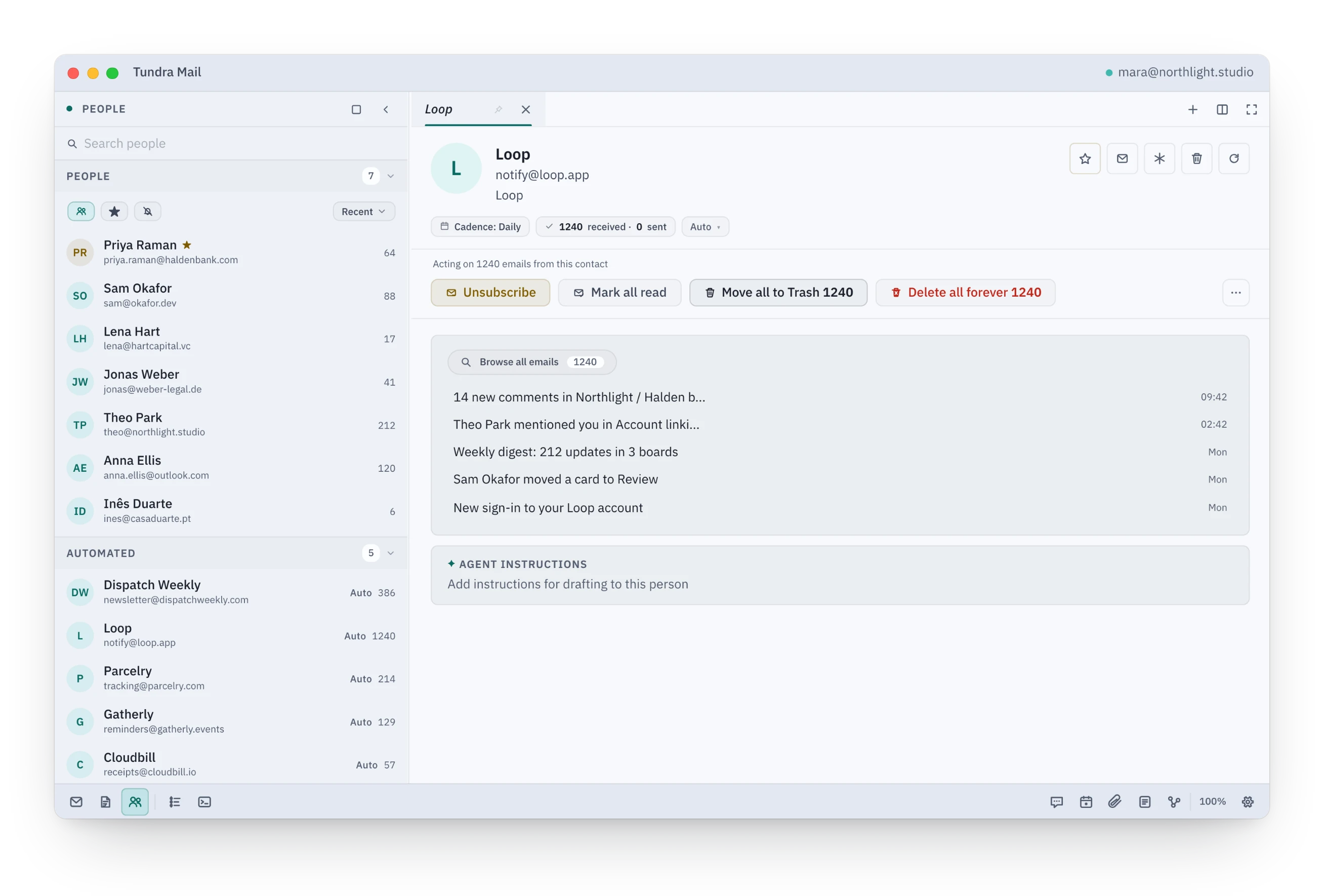
Years of one sender, gone in one decision.
Single keys move through the list and act on the selected message: j and k to move, e to archive, # to trash, h to snooze, s to star, and z to take the last action back. Every action lands in the local database first, so the row moves as you press the key.
The People dock groups mail by sender and by domain. Open one and you get one band of actions with counts that match everywhere: Unsubscribe where the sender's mail carries an unsubscribe link, Mark all read, Move all to Trash with a few seconds of Undo (six by default, adjustable in Settings › Reading), and Delete all forever behind a confirmation.
- Over 150 keyboard actions with a cheat sheet on ?. All can be rebound except the calendar keys
- Quiet sender mutes a sender inside Tundra and restores it when you reply
- Rules written in plain words and shown for review before they run. Simple filing rules are drafted without a model; anything else uses your model
- Snooze to later today, tonight, tomorrow morning, this weekend, next week or a time you type
- The Journal lists what changed and lets you undo it
Calendar
Your week in the same window as the mail it came from.
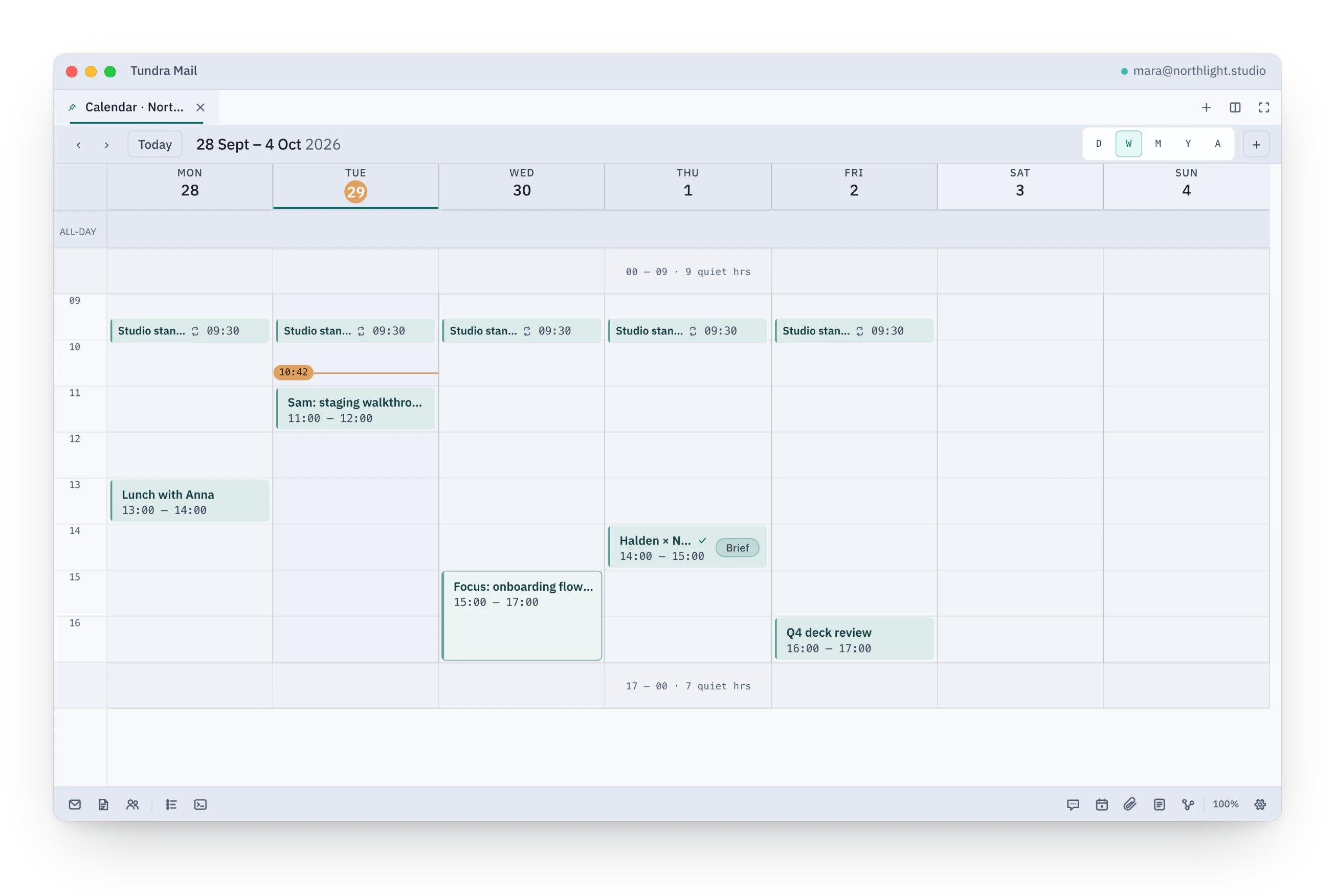
Day, Week, Month, Year and Agenda views, with empty hours folded away so the day you actually have fits on screen. Type an event in plain words, such as "Lunch with Sam Thursday 1pm", and press Enter.
Invites arrive as a card above the message with Going, Maybe and Not going. To suggest another slot, right-click the event in your calendar and choose Propose new time.
- Offer times: type /times in a letter, write "tue 2-4, wed morning", and Enter inserts those times checked against your calendar
- Recurring events ask whether a change is for this event only or for the series
- Local reminders with snooze
- A second time zone in the gutter, and each guest's local time
- Google Meet links on Google calendars; Teams and Zoom links are detected and joinable
- CalDAV calendars such as iCloud are in early beta
The window
Split panes, tabs and docks, in a theme that suits your eyes.
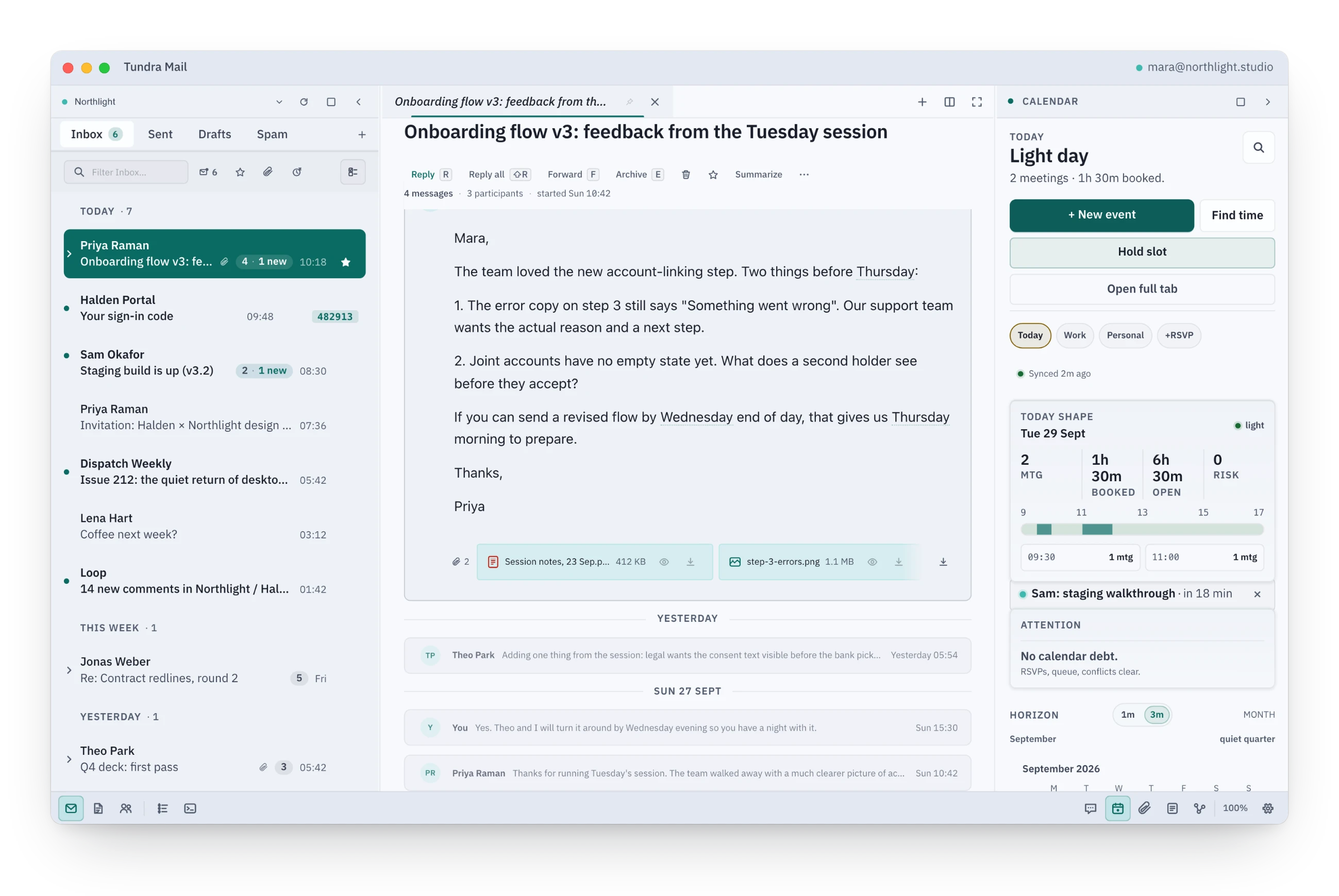
Open mail, drafts, contacts and calendars as tabs, split the canvas into panes, and keep docks for mail, people, the agent, the calendar and the Journal at the edges.
Seven themes ship with the app, from Lagoon Dark and Lagoon Light to Vellum and High Contrast, and you can write your own as a JSON file. Rows come in three densities, and the whole interface scales from 85 to 200 percent.
- Pinned tabs, reopen closed tab, ⌘1 to ⌘9
- Themes checked for contrast before they load
- A download under 45 MB
Measured, not promised
Speed you can check
Each number is a budget enforced by a test in Tundra's release gate. A build that misses one does not ship.
under25ms
to filter a 6,000-message list
Passing in the release gate
under100ms
for reads at p95 while writes saturate the database
Passing in the release gate
under500ms
for a Journal page over 100,000 rows
Passing in the release gate
under3s
to apply a 500-email trash approval locally, as one Journal row
Passing in the release gate
One scale for all four, each mark ten times the last, so a few milliseconds and a few seconds sit side by side.
Accounts
- Gmail and Google Calendar
- Sign in through your browser. You can also use your own Google Cloud project.
- Outlook.com and Microsoft 365
- Sign in through your browser. Mail and calendar.
- IMAP and SMTP
- Any mail server, with an app password stored in your keychain. iCloud, Yahoo and Fastmail are set up for you. Drafts on IMAP accounts stay on your machine.
- CalDAV
- Early beta. Calendars such as iCloud and Fastmail.
Try Tundra on your own mail.
Start with your noisiest sender.
Download for macOSFree for personal use. Open beta.